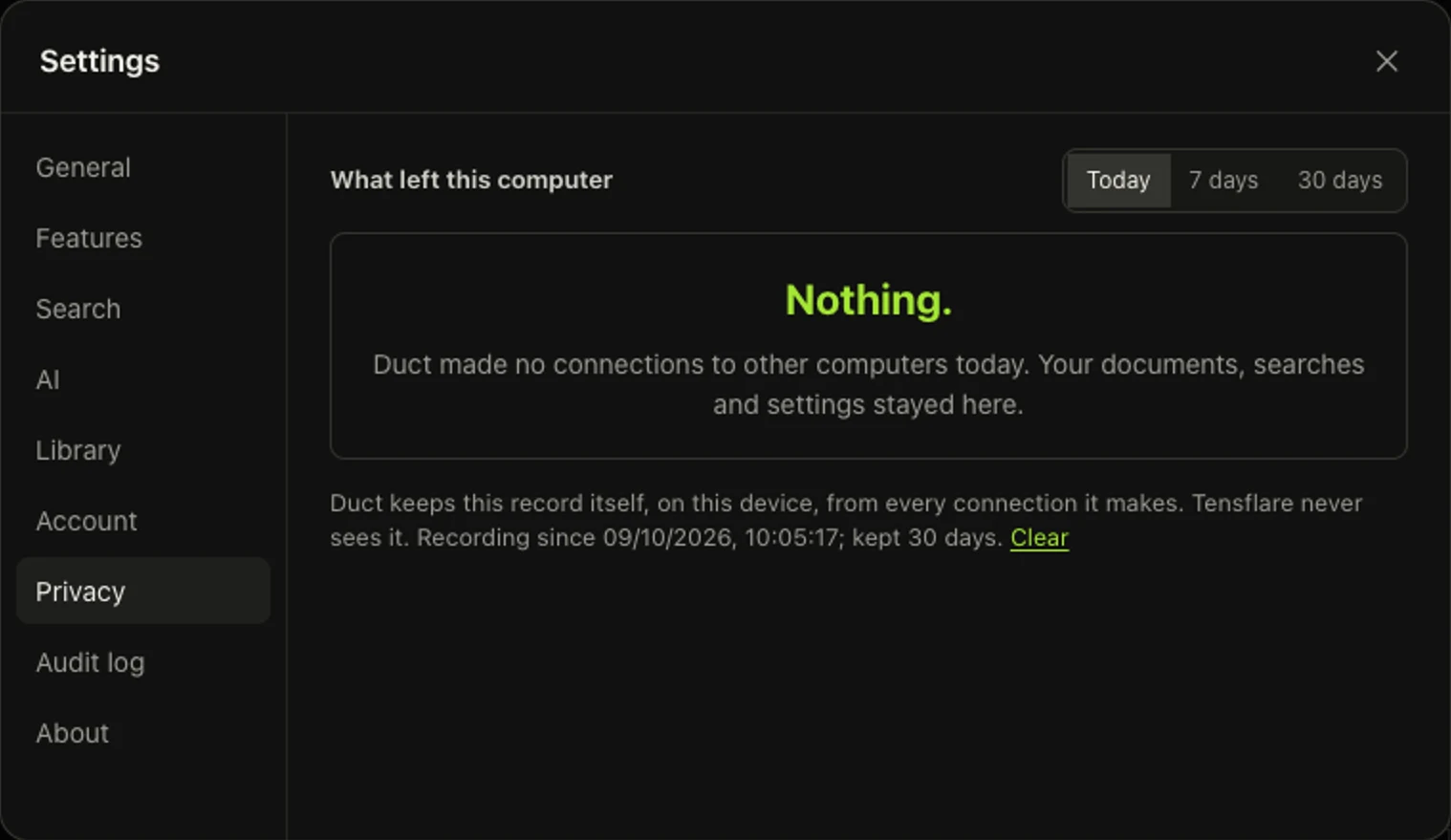
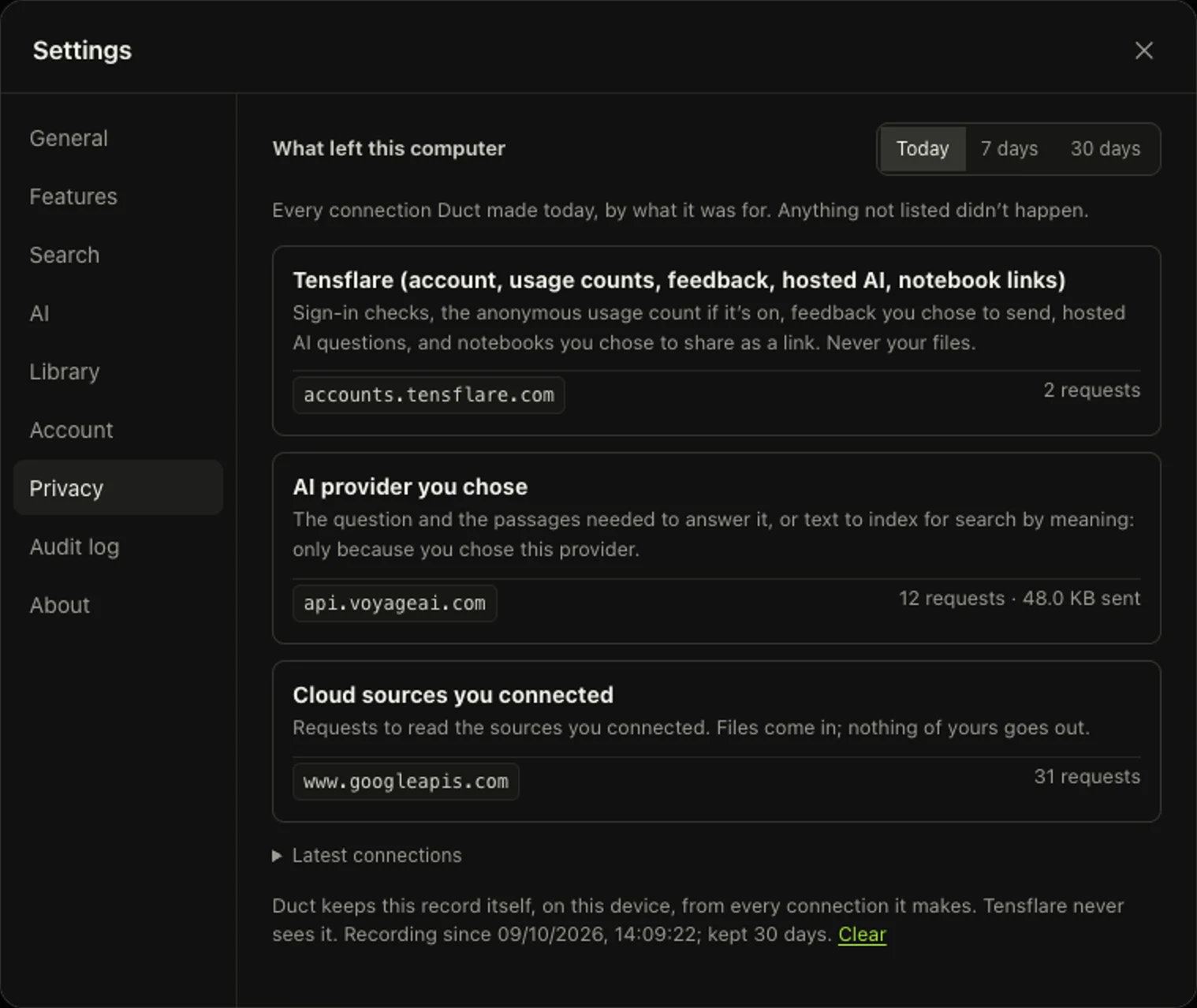
"Your documents never leave your computer" is easy to write on a website. We wanted something you could check. So Duct keeps a ledger: in Settings › Privacy you can see every computer Duct has talked to, how many times, and how much it sent, day by day.
Why not just log our own requests?
The obvious way to build this is to have each feature report its requests: sync reports to the ledger, the AI provider reports to the ledger, and so on. That only works as long as every feature, and every library those features use, remembers to report. The day one doesn't, the ledger quietly becomes wrong, which is worse than no ledger.
So the ledger doesn't rely on being told. It watches the places requests go out.
Watching the exits
A Node.js program sends HTTP requests in two ways: the global fetch(), and the older http and https modules, which many SDKs still use. Duct wraps both when it starts, before anything else runs:
const realFetch = globalThis.fetch
globalThis.fetch = (input, init) => {
  ledger.record(urlOf(input), methodOf(input, init), bodySize(init?.body))
  return realFetch(input, init)
}
http.request and https.request get the same treatment. The wrapper also counts bytes as a request body is written, so uploads are measured as they stream. One detail matters a lot: code that did import { request } from 'node:https' holds its own reference to the original function, so wrapping the module object isn't enough. Node's syncBuiltinESMExports() updates those references, so that code is seen too.
In the desktop app, the windows themselves can make requests, so Duct also watches Electron's session.webRequest.
Reading the ledger
Connections are grouped by what they were for, so you can check each against something you chose to do:
| Group | What it means | When you'd see it |
|---|---|---|
| Tensflare | Your account, the anonymous usage count (off unless you turn it on), feedback you send, hosted AI | You signed in, or use a paid plan |
| AI provider you chose | The question and the passages needed to answer it, or text for search by meaning | You set up Ask or search by meaning with your own key |
| Cloud sources you connected | Reading Google Drive, Microsoft 365 or S3. Files come in; nothing of yours goes out | You connected a source |
| Sign-in providers | Signing in to Google or Microsoft to connect a source | You connected a source |
| Web pages you added | Fetching a page you asked Duct to index | You added a web page |
What it records, and what it doesn't
For each connection the ledger keeps the host, a category (Tensflare, the AI provider you chose, cloud sources you connected, sign-in, or web pages you added), the number of requests and the bytes sent. Connections to your own computer, such as Duct's own window or a local AI model, aren't counted, because they never leave it.
It deliberately does not keep full addresses. A URL can contain a file name or a search, and a list of your searches is exactly the kind of thing that shouldn't sit in a log. The only paths it keeps are for Tensflare's own fixed endpoints, which name nothing of yours. The ledger lives on your computer, holds 30 days, and you can clear it.
What it can't see
We'd rather be precise than reassuring:
- It sees Duct's own connections. It doesn't see other programs on your computer.
- It sees requests made through Node's networking and the app's windows. Code that opened raw sockets, or native code inside a dependency that bypassed Node, wouldn't show up. We don't know of any part of Duct that does either, and the code is open so anyone can check.
- It's a record, not a firewall. It tells you what happened; it doesn't block anything.
If you want to test it, the best way is the bluntest: switch off your Wi-Fi. Search keeps working, because it never needed the network.